Discovery & Co-Branded Checkout
This guide walks through the search and discovery endpoints to find venues and showtimes, then hand off to Atom’s co-branded checkout for ticket purchase.
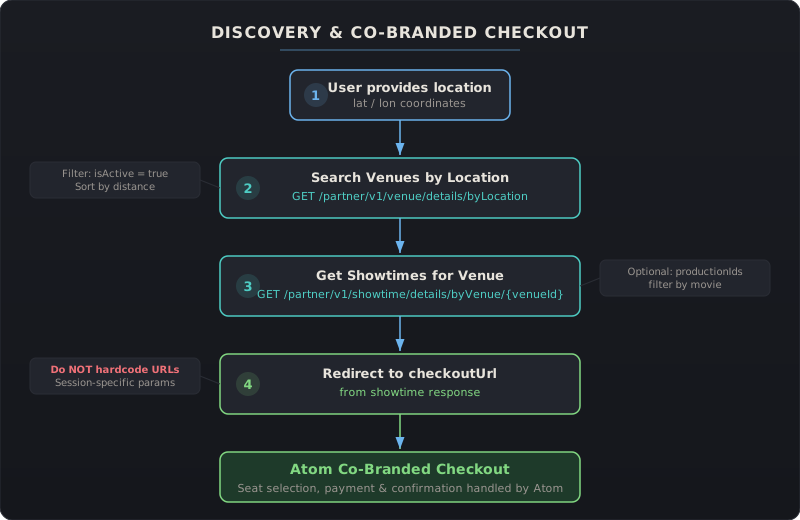
Step 1: Find Nearby Venues
Section titled “Step 1: Find Nearby Venues”Search for active theaters near the user’s location using latitude, longitude, and a search radius.
Endpoint: GET /partner/v1/venue/details/byLocation
| Parameter | Example | Description |
|---|---|---|
lat | 34.0195 | User’s latitude |
lon | -118.491 | User’s longitude |
radius | 32 | Search radius in km (max 80) |
pageSize | 25 | Results per page (default 25, max 100) |
The response returns a list of VenueDetailsResponse objects ordered by distance. Each venue includes:
venueId— needed for the next stepname,address,latitude,longitude— for displayisActive— filter to only show active venuesvenueUrl— deep link to the venue on Atom’s website
Full reference: Venues API | Venue Examples
Step 2: Get Showtimes for a Venue
Section titled “Step 2: Get Showtimes for a Venue”Once the user selects a venue, fetch its available showtimes within a date range.
Endpoint: GET /partner/v1/showtime/details/byVenue/{venueId}
| Parameter | Example | Description |
|---|---|---|
venueId | C00110921804 | Selected venue’s ID |
isoStartDate | 2026-02-13T00:00:00.000Z | Start of date range |
isoEndDate | 2026-02-14T23:59:59.000Z | End of date range |
productionIds | B00809994585 | (Optional) Filter by movie |
The response returns ShowtimeDetailsResponse with an array of showtimes. Each showtime includes:
showtimeId— unique identifierlocalShowtime— display time in the venue’s timezoneproductionTitle— movie namecheckoutUrl— the key field for co-branded checkoutattributeMap— screen format (IMAX, Dolby, etc.), accessibility featurespreOrderDetails— pricing information and ticket availability
Full reference: Showtimes API | Showtime Examples
Step 3: Redirect to Co-Branded Checkout
Section titled “Step 3: Redirect to Co-Branded Checkout”When the user picks a showtime, redirect them to the checkoutUrl from the showtime response.
checkoutUrl: "https://rw-beta.atomtickets.com/checkout/redirect?productionId=B00418470916&venueId=C0057070265&localShowtime=2026-02-14T19:30:00&iref=atomapi"What happens next — Atom’s co-branded checkout handles everything:
- Seat selection — the user picks their seats in Atom’s interface
- Payment — payment is collected through Atom’s checkout
- Confirmation — the user receives their ticket confirmation and QR codes
Your application does not need to manage the checkout flow. The co-branded experience is styled to match your partner configuration.
Filtering by Movie (Optional)
Section titled “Filtering by Movie (Optional)”If your app shows a specific movie and the user needs to find where it’s playing, you can:
- Search venues by location (Step 1 above)
- Get showtimes for each venue, passing
productionIdsto filter by the target movie - Display only venues that have matching showtimes
Alternatively, use the Productions API to look up movie details and get productionId values for filtering.
Alternative Venue Search Methods
Section titled “Alternative Venue Search Methods”Besides location-based search, the Venues API supports:
| Method | Endpoint | Use case |
|---|---|---|
| By IDs | POST /partner/v1/venue/details/byIds | Look up specific known venues |
| By Name | GET /partner/v1/venue/details/byName | Text search within geographic bounds |
| By Vendor ID | POST /partner/v1/venue/details/byVendorId | Map your internal IDs to Atom IDs |
Full reference: Venues API
Summary
Section titled “Summary”| Step | Action | Endpoint | Key output |
|---|---|---|---|
| 1 | Find nearby venues | GET .../venue/details/byLocation | venueId |
| 2 | Get showtimes | GET .../showtime/details/byVenue/{venueId} | checkoutUrl |
| 3 | Redirect to checkout | Open checkoutUrl in browser | Ticket purchased |
This is the simplest integration path — three API calls and a redirect. For full control over the checkout experience (seat selection, payment processing, order management), see the Ordering Workflow guide.