Ordering Workflow
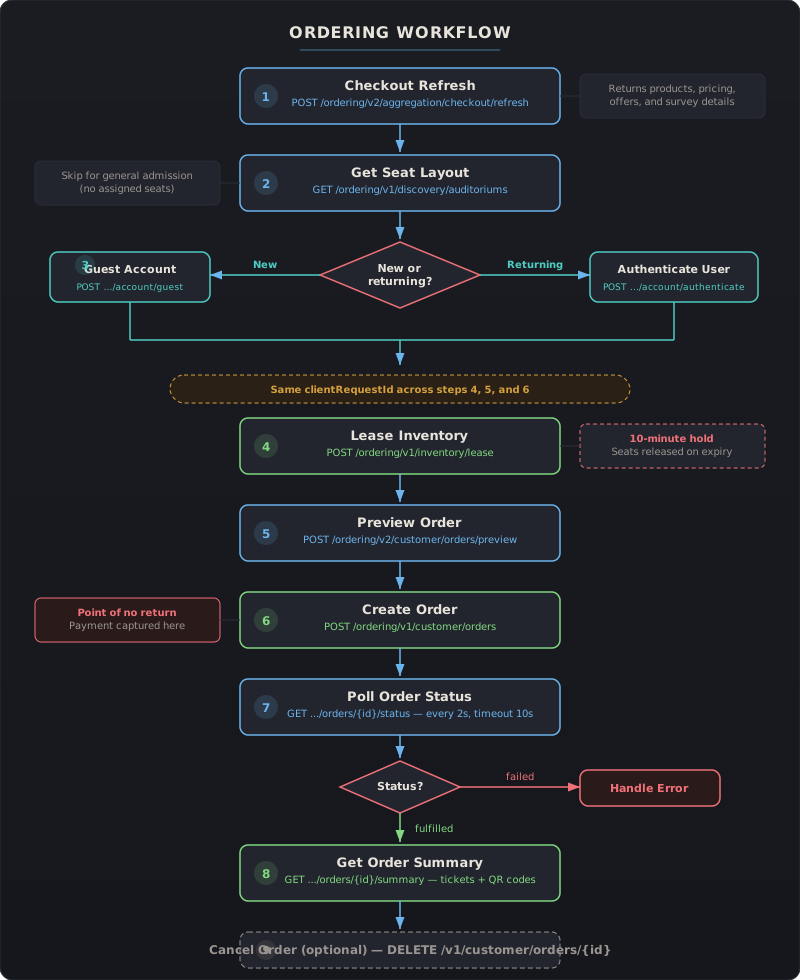
This guide covers the full ordering workflow where your application controls the entire checkout experience through Atom’s API — seat selection, payment, order management, and ticket delivery.
Before You Start
Section titled “Before You Start”This workflow assumes you’ve already identified a showtime using the Discovery flow (venue search + showtime lookup). You’ll need:
- A valid
showtimeIdfrom the Showtimes API - Your
x-api-keyfor all requests - Product and offer IDs from the Checkout Refresh response
The clientRequestId Rule
Section titled “The clientRequestId Rule”Generate a unique clientRequestId (e.g., UUID) at the start of each checkout flow. Use the same value across these three calls:
- Lease Inventory (Step 4)
- Preview Order (Step 5)
- Create Order (Step 6)
Only rotate to a new clientRequestId after reaching a terminal state — order confirmed, order failed, or timeout. Reusing a clientRequestId from a previous flow will return a DUPLICATE_CLIENT_REQUEST_ID error.
Step 1: Initialize Checkout
Section titled “Step 1: Initialize Checkout”Fetch available ticket types, pricing, promotions, and survey details for the selected showtime.
Endpoint: POST /ordering/v2/aggregation/checkout/refresh
| Field | Type | Description |
|---|---|---|
showtimeId | String | Showtime to check out |
promotions | List[String] | Promotion codes to apply |
includeAreaCategory | Boolean | Include seating area categories |
Key response fields:
showtimesResponse.products[]— available ticket types withproductId,offerId, andpricemaxTicketQuantity— maximum tickets per transactionsurveyDetailResponse— age verification or other required surveysagePolicyLink— age restriction policy URL
Use the productId and offerId values in subsequent steps.
Full reference: Ordering API — Checkout Refresh | Example
Step 2: Get Seat Layout
Section titled “Step 2: Get Seat Layout”For reserved seating venues, retrieve the auditorium map so users can pick their seats.
Endpoint: GET /ordering/v1/discovery/auditoriums?showtimeId={showtimeId}&tickets={count}
| Parameter | Description |
|---|---|
showtimeId | From Step 1 |
tickets | Number of tickets the user wants |
Key response fields:
layoutArea.rows[]— row-by-row seat layout withseatId,status(available/occupied), andseatTyperecommendedSeats— Atom’s suggested best-available seatslegend— seat type color coding (standard, premium, etc.)numAvailable— total available seats
Full reference: Ordering API — Get Seat Layout | Example
Step 3: Authenticate the User
Section titled “Step 3: Authenticate the User”Before reserving seats, you need an auth token. Choose one path:
Option A: Guest Account (new users)
Section titled “Option A: Guest Account (new users)”Endpoint: POST /ordering/v1/customer/account/guest
| Field | Type | Description |
|---|---|---|
email | String | Guest’s email |
firstName | String | First name |
lastName | String | Last name |
attributionMap | Map[String, String] | Partner tracking info |
Returns authToken and accountId. Set isGuestOrder: true in Steps 5 and 6.
Option B: Existing User (returning users)
Section titled “Option B: Existing User (returning users)”Endpoint: POST /ordering/v1/customer/account/authenticate
| Field | Type | Description |
|---|---|---|
identityValue | String | User’s email |
password | String | User’s password |
Returns token, accountId, atomToken, and privateKey for request signing.
Authentication Headers
Section titled “Authentication Headers”From this point forward, all requests require these headers in addition to x-api-key:
| Header | Description |
|---|---|
X-Atom-Timestamp | Current time as ISO 8601 with UTC timezone |
X-Atom-AuthToken | Token from authentication response |
X-Atom-DeviceSignature | Generated from device information |
X-Atom-Signature | Generated from request parts + auth info |
X-Atom-DeviceId | Device identifier (does not need to be unique) |
X-Atom-AdId | Ad serving identifier (does not need to be unique) |
Full reference: Ordering API — Guest Account | Ordering API — Authenticate | Authentication Guide
Step 4: Reserve Seats (Lease Inventory)
Section titled “Step 4: Reserve Seats (Lease Inventory)”Temporarily lock the selected seats while the user completes checkout. The lease holds seats for a limited time (typically 10 minutes).
Endpoint: POST /ordering/v1/inventory/lease
| Field | Type | Description |
|---|---|---|
clientRequestId | String | Unique ID for this checkout flow (keep for Steps 5-6) |
leaseItems | List | Array of seat selections |
Each leaseItem contains:
| Field | Type | Description |
|---|---|---|
productId | String | From Checkout Refresh products |
offerId | String | From Checkout Refresh offers |
seatIds | Set[String] | Selected seat IDs from layout |
The response returns leaseDurationSeconds — your countdown timer. If the lease expires before the order is placed, the seats are released and you must start over.
Full reference: Ordering API — Lease Inventory | Example
Step 5: Preview Order
Section titled “Step 5: Preview Order”Validate the full order with final pricing before committing. This step does not charge the user.
Endpoint: POST /ordering/v2/customer/orders/preview
The request body wraps an orderParameters object:
| Field | Type | Description |
|---|---|---|
lineItems | List | Products and quantities |
channel | String | "Partner" |
clientVersion | String | Your app version |
clientRequestId | String | Same as Step 4 |
isGuestOrder | Boolean | true if guest account (Step 3A) |
paymentProcessor | String | "PartnerPay" if you handle payment |
associateTags | Map[String, String] | Partner identification (e.g., "affiliateName": "fever") |
Key response fields:
receipt.subtotal— ticket prices before feesreceipt.serviceFee— Atom service feereceipt.tax— applicable taxreceipt.totalAmount— final amount to charge the userautoAddedItems— any automatically added items (e.g., convenience fees)
Display the receipt breakdown to the user for confirmation before proceeding.
Full reference: Ordering API — Preview Order | Example
Step 6: Place the Order
Section titled “Step 6: Place the Order”Commit the order. Payment is captured and tickets are issued.
Endpoint: POST /ordering/v1/customer/orders
The request body is identical to Step 5 — same orderParameters with the same clientRequestId.
Response:
| Field | Description |
|---|---|
orderId | Unique order identifier |
eventId | Event tracking identifier |
Save the orderId — you’ll need it for all subsequent calls.
Full reference: Ordering API — Create Order | Example
Step 7: Confirm Fulfillment
Section titled “Step 7: Confirm Fulfillment”Poll the order status endpoint until the order is fulfilled by the vendor.
Endpoint: GET /ordering/v1/customer/orders/{orderId}/status
Recommended polling strategy:
- Poll every 2 seconds
- Timeout after 10 seconds
- If timeout is reached, treat as a potential failure and show an appropriate message
| Status | Meaning | Next action |
|---|---|---|
fulfilled | Tickets issued by vendor | Proceed to Step 8 |
failed | Order could not be completed | Show error, check reason |
| (no change) | Still processing | Continue polling |
Failure reason codes:
| Code | Meaning |
|---|---|
SEAT_UNAVAILABLE | Selected seats were taken |
INVENTORY_UNAVAILABLE | No inventory available |
FRAUD_DETECTED | Transaction flagged as fraudulent |
INVALID_CREDIT_CARD_NUMBER | Payment card issue |
PROCESSOR_DECLINED | Payment processor declined the transaction |
GENERIC_ERROR | Unspecified error |
Full reference: Ordering API — Poll Order Status | Example
Step 8: Get Tickets
Section titled “Step 8: Get Tickets”Once the status is fulfilled, retrieve the complete order details including ticket barcodes and QR codes.
Endpoint: GET /ordering/v2/customer/orders/{orderId}/summary
Key response fields:
tickets[]— array of individual tickets, each with:seatLabel— seat number for displayticketType— ticket category (Adult, Child, etc.)vendorQrCodeData— primary QR code data for theater entryvendorBookingId— fallback identifier if QR data is unavailable
venueInfo— theater name and addressshowtime— start time, auditorium, screen typereceipt— final pricing breakdown
Full reference: Ordering API — Get Order Summary | Example
Step 9: Cancel Order (Optional)
Section titled “Step 9: Cancel Order (Optional)”Cancel a confirmed order if the showtime hasn’t passed yet.
Endpoint: DELETE /v1/customer/orders/{orderId}
No request body is needed — the orderId is in the URL path.
Response:
| Field | Description |
|---|---|
cancellationStatus | "cancelled" on success |
refundAmount | Amount refunded to the user |
cancellationReason | Reason description |
Cancellation error codes:
| Code | Meaning |
|---|---|
ORDER_NOT_FOUND | Invalid order ID |
ORDER_NOT_CANCELLABLE | Order state doesn’t allow cancellation |
CANCELLATION_WINDOW_EXPIRED | Showtime has passed |
REFUND_PROCESSING_ERROR | Refund could not be processed |
Full reference: Ordering API — Cancel Order | Example
Quick Reference
Section titled “Quick Reference”| Step | Action | Endpoint | Auth required | Key output |
|---|---|---|---|---|
| 1 | Checkout Refresh | POST .../checkout/refresh | API key only | Products, pricing |
| 2 | Seat Layout | GET .../auditoriums | API key only | Seat map |
| 3 | Authenticate | POST .../account/guest or .../authenticate | API key only | Auth token |
| 4 | Lease Inventory | POST .../inventory/lease | Full auth | Seat reservation |
| 5 | Preview Order | POST .../orders/preview | Full auth | Final receipt |
| 6 | Create Order | POST .../customer/orders | Full auth | orderId |
| 7 | Poll Status | GET .../orders/{id}/status | Full auth | Fulfillment status |
| 8 | Order Summary | GET .../orders/{id}/summary | Full auth | Tickets + QR codes |
| 9 | Cancel (optional) | DELETE /v1/customer/orders/{id} | Full auth | Refund confirmation |
Related pages: Ordering API Reference | Ordering Models | Ordering Examples